pEALA.STUDIO
Project Type
Personal project
Role
End-to-end product development.
Goal
Design a new way for people to work with AI that moves beyond linear chat interfaces and better supports how humans naturally organize ideas, manage context, and develop ongoing projects.
Results
Created a spatial AI workspace where users can organize information visually, reuse context as prompts, and save AI outputs directly into their project environment, reducing cognitive load and making AI collaboration more structured and efficient.
Which Tools
Figma, Cursor, Visual Studio Code

Description
Most AI products rely on a chat-based interface where users type prompts and receive responses. While this works well for simple questions, it becomes inefficient for long-term projects, structured thinking, and knowledge work.
This project introduces a workspace-based interface that allows users to:
- organize notes and ideas spatially
- select information visually to use as prompts
- save AI outputs directly into the workspace
- build structured workflows with AI assistance
Instead of constantly rewriting prompts, users can reuse existing information in their workspace to generate better AI responses.
Problem statement
Chat-based AI interfaces create several usability problems for complex and ongoing projects.
1. High cognitive load
In chat interfaces, all messages appear in one long linear thread. Important information gets buried, so users keep scrolling and searching.
2. Poor support for ongoing projects
Chat tools are built for isolated exchanges, not long-term workflows. As history grows, context becomes harder to track and reuse.
3. Difficulty managing context
Good AI responses need detailed prompts, but users must repeatedly re-explain goals and project background in every new conversation.
4. Weak knowledge retention
Research in cognitive psychology shows that spatial memory helps humans remember information. When learning from physical materials like books, people often remember where information was located. Scrolling through digital chat removes that spatial reference, making it harder to revisit and recall important information.
5. Fragmented workflows
Users jump between chat, notes, docs, and files while working with AI, which breaks flow and slows productivity.
Core insight
Humans process information more efficiently when they can:
- organize information spatially
- interact with content physically or visually
- group related ideas together
Traditional chat interfaces remove these advantages.
Instead of working in a linear conversation, users benefit from working in a visual workspace where ideas can be arranged, grouped, and reused.
Solution
I designed a visual AI workspace that combines note-taking, project organization, and AI interaction into a single environment.
The system works like a digital canvas, where users can create and organize information blocks.
These blocks can include:
- notes
- documents
- AI outputs
- prompts
- project resources
Users can then select any elements on the workspace and use them as input for AI prompts.
This eliminates the need to repeatedly rewrite context.
Example workflow
A typical workflow for a content creator might look like this:
Step 1: Define brand identity
The user creates a document on the workspace describing:
- their brand
- target audience
- tone of voice
- content goals
Step 2: Generate video ideas
The user selects the brand identity document and asks AI to generate video ideas. AI produces several suggestions.
Step 3: Save useful ideas
The user pins selected ideas to the workspace.
Step 4: Generate a script
The user selects:
- the brand identity document
- one chosen video idea
Then asks AI to generate a full script. Because the context already exists on the workspace, the prompt is short but highly effective.
Key features
BUILD YOUR THINKING SPACE:
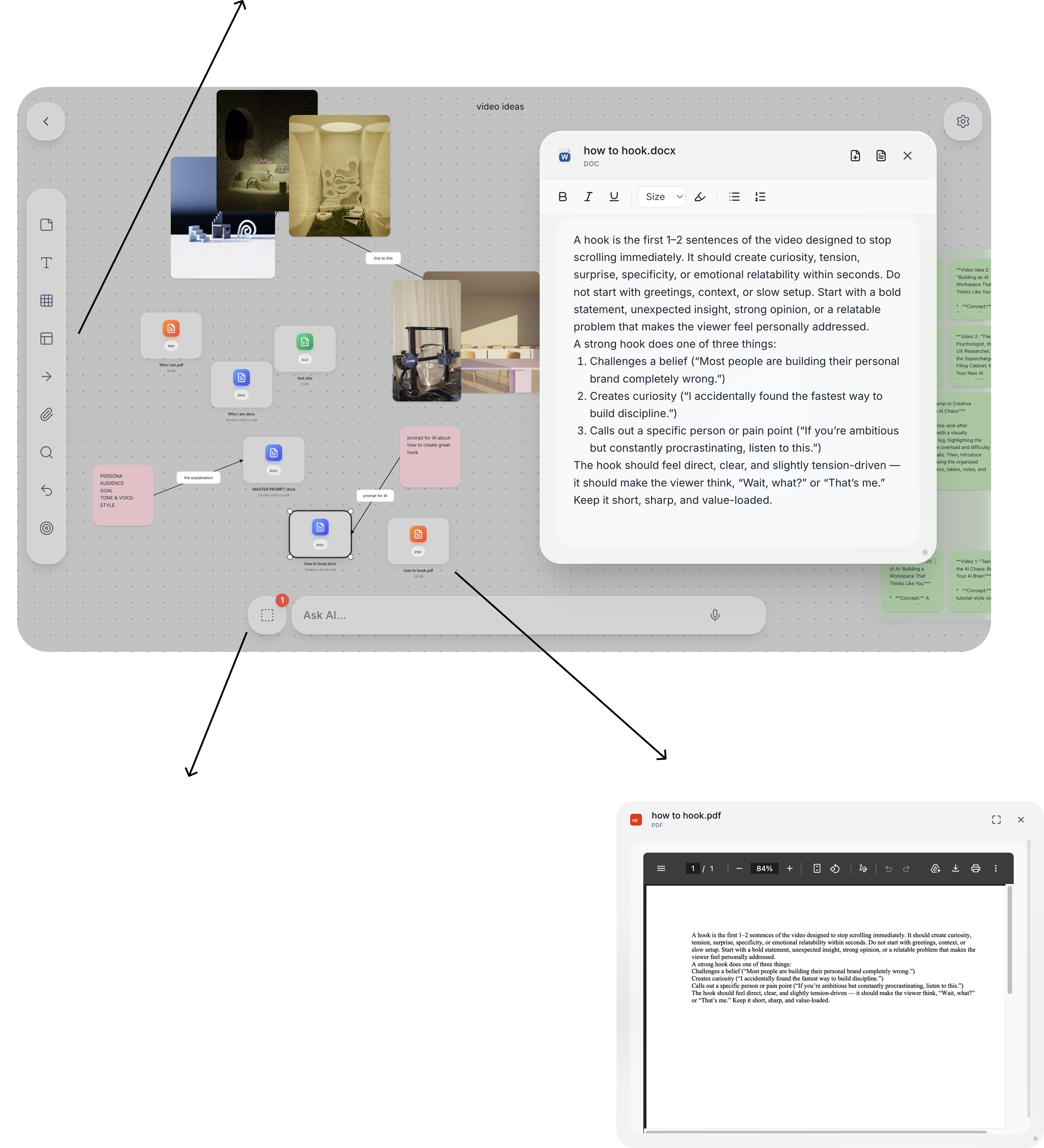
Use the tools here, including Notes, Text, Tables, Sections, Connect, Attach, and Search, to build your own workspace. Shape it into a place where you can explore ideas, organize your thoughts, and bring your work to life.
SELECT-TO-PROMPT INTERACTION:
Any item on the canvas can be selected and used as part of an AI prompt. Instead of writing a long prompt manually, users simply select relevant content.
This reduces effort and improves prompt quality.
BUILT-IN DOCUMENT TOOLS:
Users can create and export documents directly from the workspace.
Supported exports include:
- Word
- Excel
This removes the need to switch between multiple applications.
CANVAS WORKSPACE:
Users work inside a flexible visual canvas where they can create and organize information blocks. This mimics the spatial organization of physical workspaces.

AI OUTPUT PINNING:
AI responses can be exported directly onto the workspace.
This allows users to:
- save useful outputs
- organize them visually
- reuse them later
BUILD YOUR THINKING SPACE:
Use the tools here, including Notes, Text, Tables, Sections, Connect, Attach, and Search, to build your own workspace. Shape it into a place where you can explore ideas, organize your thoughts, and bring your work to life.
SELECT-TO-PROMPT INTERACTION:
Any item on the canvas can be selected and used as part of an AI prompt. Instead of writing a long prompt manually, users simply select relevant content.
This reduces effort and improves prompt quality.
BUILT-IN DOCUMENT TOOLS:
Users can create and export documents directly from the workspace.
Supported exports include:
- Word
- Excel
This removes the need to switch between multiple applications.
CANVAS WORKSPACE:
Users work inside a flexible visual canvas where they can create and organize information blocks. This mimics the spatial organization of physical workspaces.
AI OUTPUT PINNING:
AI responses can be exported directly onto the workspace.
This allows users to:
- save useful outputs
- organize them visually
- reuse them later
WHY THIS MATTERS
The system shifts AI interaction from conversation-based thinking to workspace-based thinking.
This approach:
- reduces cognitive load
- improves context management
- supports ongoing projects
- enables better collaboration with AI
KEY TAKEAWAYS
Most current AI tools treat intelligence as a conversation. Users ask a question, receive an answer, and continue the interaction through a linear chat thread.
This works well for quick questions, but it becomes limiting when users are working on complex or ongoing projects. Conversations are inherently linear, but human thinking is not.
People rarely process ideas in straight lines. Instead, we think in connections, clusters, fragments, and relationships between ideas. We organize thoughts spatially through notes, diagrams, whiteboards, and physical documents.
This project explores a different model for interacting with AI. AI as a thinking environment rather than a conversation interface.
By allowing users to organize information visually, select context directly from their workspace, and save AI outputs as reusable knowledge, the system supports a more natural way of thinking and working.